Creating Mod Packages (Plugins)
info
This section covers creating packages recognized by the game natively (plugin mod packages), replacing or adding new content to the game.
Prerequisites
- Unreal Engine 4.27
- Mod Tools and MkRelease - tools created by AffrayCo, Mod Tools not required if not utilizing the SDK
- Project Launcher Profile
Creating the Mod Plugin
To create a plugin for modding in Unreal Engine 4.27:
- Open Unreal Engine 4.27, then go to
Edit > Plugins. - Click
New Pluginto open the Plugin Creator. - Select
Content Only. - Enter a
Plugin Name, and fill out theAuthorand (optionally)Descriptionfields. - Once the plugin has been created, place all your mod content inside the plugin’s folder.
- In the
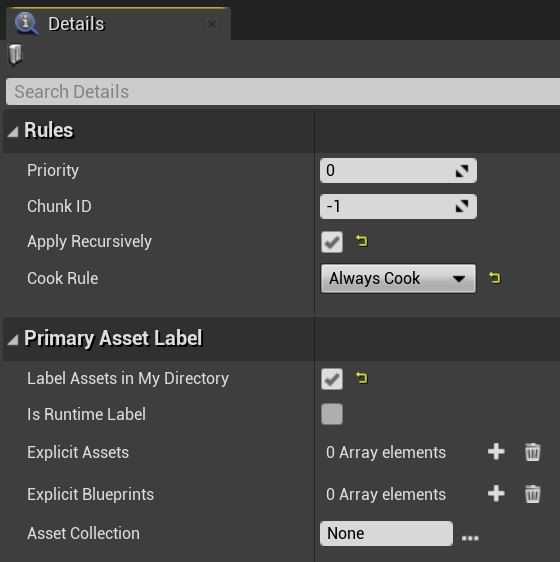
Content Browser, right-click and selectMiscellaneous > Data Asset, then search forPrimaryAssetLabel.
Fill out the Data Asset as shown below:
Creating a MkRelease Script
- Download the MkRelease batch script.
- Open
PowerShellby right-click inside theFile Explorerand selectingOpen in Terminal. - Run the following command:
& "C:\Your Project Name\MkRelease.bat" "C:\Program Files\Epic Games\UE_4.27" "Your Game Install Directory\5K" "Current Game Version"
- Your Project Name — The name of your Unreal Engine project (where your .uproject file is located).
- Your Game Install Directory — The installation directory of the game (where Pandemic.exe is located).
- Current Game Version — The version of the game your mod targets, e.g. 0.17.1.
If successful, a few new folders and files should be created in your project folder:
Releases > 0.17.1 > WindowsNoEditor > AssetRegistry.bin & Metadata > DevelopmentAssetRegistry.bin
Packaging the Mod Plugin
After creating your plugin and placing your mod content, navigate to Window > Project Launcher
- Install the Project Launcher Profile. This file should be placed in your Engine install directory under
UE_4.27\Engine\Programs\UnrealFrontend\Profiles - A new profile called
Modshould now appear in theProject Launcher.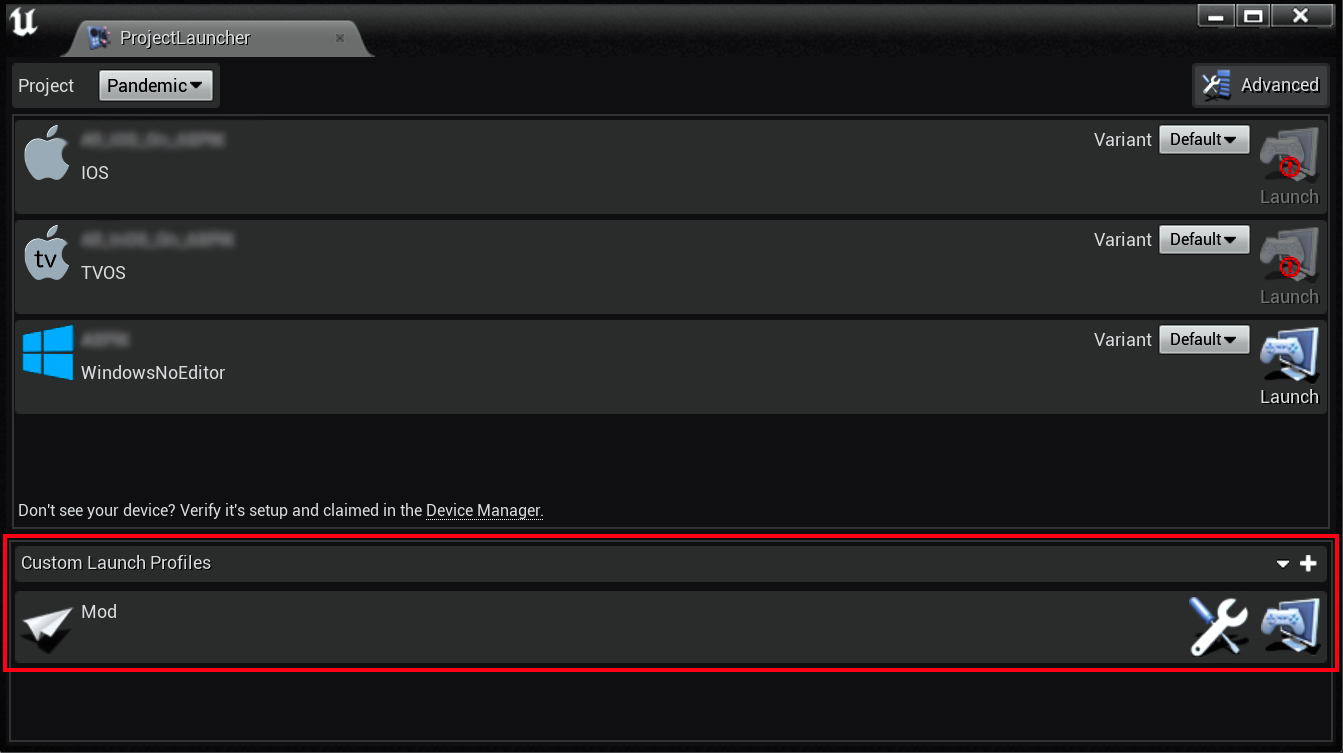
- Click the Wrench icon to edit the profile, then under
Package, set your desiredOutput Folder. - In the Cook section, update the
Release versionfields under bothAdvanced SettingsandRelease / DLC / Patching Settings. - Change
Name of the DLC to buildto match yourMod Pluginname. This is important! - After packaging, your mod files will be located in the output folder, next install your mod!